

2·
3 hours agoI didn’t realize okular supports a lot of other formats. As singular user I think this fits my needs. I’m especially interested that it can view .md files as well as open cbr and cbz files as well.
I think this is going to be my main.
Has accounts on lemmy.zip, lemmy.world, fedia.io and kbin.earth with the same handle
I didn’t realize okular supports a lot of other formats. As singular user I think this fits my needs. I’m especially interested that it can view .md files as well as open cbr and cbz files as well.

To me that includes mastodon. Which I personally don’t care about, at least in the presentation and generally microblogging. I want to say “this is the fediverse’s reddit. Go here.” to my friends.
Thats not the moomin I expected, but I am moomin’ now.
Forget big accounts, I feel like we need a good name for Lemmy/mbin/piefed. I still remember someone here accuse me of shilling for Meta’s Threads when I said threadiverse to refer to Lemmy/mbin/piefed.

On the other hand they seem to be the only one alongside lenovo that tries to do something different with laptops. Like dual monitor laptops. They’ve been at that for years and keep improving.
But maybe I’m misunderstanding what a fad is, and I’m just easily fooled by gimmicks lol
While the snark is very much deserved, it’s most likely augmented reality glasses. Either providing virtual screens like say XReal or Viture, thus smaller and less cumbersome than Apple Vision. Or something a lot more wearable like the Meta Rayban sunglasses with POV camera and speakers.
They can cram any kind of AI fluff in there.
I debilitating affliction if you’re a manybagger like me. You’ll then have a backpack for every occasion.

I saw GParted on the CachyOS ISO. I’m sure it’s on other distro’s ISO. I can give that a look.
Thank you for replying.
1: for general computing, like storing your photos, documents, etc, just fine. I wouldn’t store a database or run programs from it.
Noted. I won’t be running any self-hosting or installing programs on it. It’s almost full with photos, docs and videos as is. I’ll have to see if I can get a deal on storage to back up the files and reformat it down the line. Someone suggested to do partition magic and honestly I’m afraid to do it haha.
2: always, even if not distro hopping. You can use a volume aware filesystem like Btrfs and have @ mounted on / and @home mounted on /home, so you don’t have to pre allocate space for one or another. Many distros will detect this setup and smartly use snapshots to revert upgrades without touching your home dir.
Interesting thing I saw yesterday when I “test run” to install Fedora KDE Plasma on a USB stick. I didn’t go through with it, but I noticed that the installer suggest to partition my drive as such:
sdc1 - format as efi - /boot/efi
sdc2 - format as efi - /boot
sdc3 - format as btrfs subvolume - /
sdc4 - format as btrfs subvolume - /home
Is that a good default? on the page that ask whether to install fedora side by side another OS, full wipe, or manual partition, I noticed that whatever drive I want to use it already have to be non Windows friendly. In my case, my nvme is in NTFS naturally, my HDD is in NTFS as well, and my test USB stick is in exfat.
(I copied this on my main post as well for others finding this post later)

Woah, pretty good animeinourworld candidate. I wonder if we have a comm for it already

That’s funny, my dad just watched this earlier. I didn’t really paid attention and I had stuff to attend to. Maybe I’ll give it a go someday.
His reason? Matt Damon and Ben Affleck are in the movie lol
Well, it is another method, even if tedious lol. Thanks
If you have enough space, or can create enough space, for a new partition in a better format, you can always move some files to the other partition, then shrink the NTFS partition to make space for extending the new partition, copy some files once again, and continue until done.
Oh? I never came across this way when I was researching. So currently I have like 280GB out of 1.8TB of free space of that drive. so I can partition that free space in say extfat, if I do it on Windows?
I assume it has to be on windows because I copy over the files from the NTFS partition to the example exfat partition, shrink the NTFS partition, expand the exfat partition, and repeat.
Or, you borrow a large hard drive from someone, copy all files on it, nuke the NTFS partition, create a new partition in another format, then copy the files from the borrowed hard drive back on the new partition.
But this is the simplest way. I’ll ask my friends if they have spare 2TB I can borrow.
Yep, have to do that down the line. My work files are already backed up to my portable SSD, although the portable is only 500GB as well. It’s the other personal files that I have to figure out. If I can find a deal for a same size disk or larger in these trying times, I can get to formatting it.
noted. I’ll still have to think if I really want it.
Thank you. Honestly I never used that one, so TIL I guess.
Certainly. I don’t plan to use the direct output from AI, just that sometimes even not using google to search for answers I seem to get lost. I’ll go to to the sources the AI cites to read them myself.
Thank you for replying.
- OK in the short term, terrible in the long run. NTFS does not support Linux file permissions, so the max you can use it for is storage of data, but FS checks for NTFS unser Linux are error prone
I see. that’s what I’m worried about when I was researching about it. A lot of what I found is that long term is really risking my data to have errors. If push comes to shove, I might just have to buy SATA SSDs and RAID them since my motherboard supports it on the BIOS (?) level.
- yes, definitely. Normally i put all FS that i can write to as a user on separate parts
Noted. I’ll partition the / and the /home into its own separate partitions.
- wipe it if you can somehow get the fägame from steam or a native Linux Version maybe from gog. If not you could copy thröem to a New Linux fs for wine or proton
Steam seems to be able to back up games files on its own. I’ll look into this more.
Yeah the NTFS drive is a real road block when I have hyped myself up to change to linux for good on my PC. Everything I’m willing to wipe from my C: drive (the NVMe OS drive) I have backed up to the NTFS drive and my portable SSD, but I don’t really want to work out of that portable SSD in the long term.
Thank you for replying. Is the steam game backup/restore the setting option on steam to move steam games between different drives:
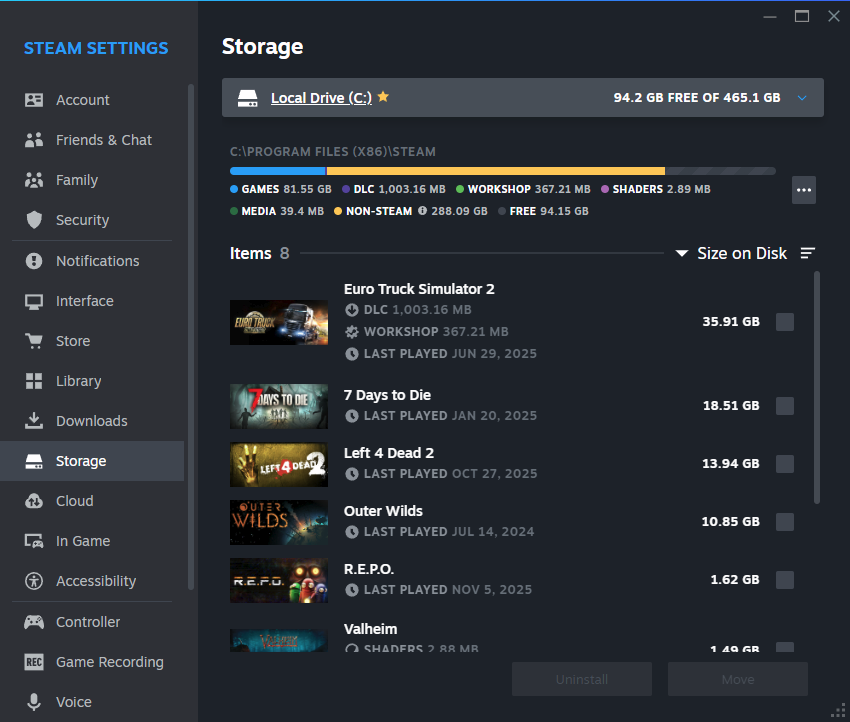
Or this one?:
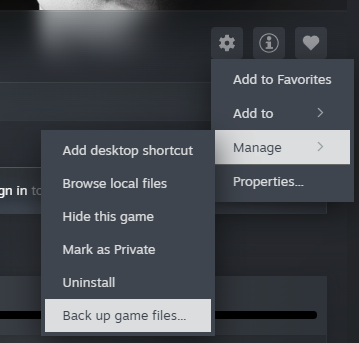
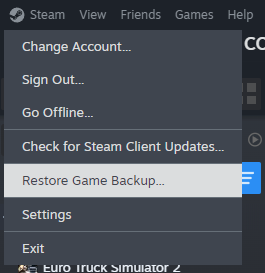
You are better off going to Linux discords and forums and chatting with humans that have experience.
I check out the source that AI cites and go from there. This is usually in conjunction with using other search engines as well that’s not Google.













You can subscribe, follow and interact with other communities not on lemmy.world and other instances without making an account for each. I recommend piefed.social because their on boarding is awesome to get you started. You then can search for the communities suggested to easily follow them in piefed’s view