TL;DR -
Question 1: how bad would it be to mount a NTFS drive and continue using it in NTFS format with Linux?
Question 2: should I partition my drive to have separate / partition and /home partition if I’m planning to distro hop?
Question 3: can I make Steam use game files on my secondary NTFS HDD?
I’m getting fed up with Windows day by day with how slow and chuggy it is.
My initial plan to buy a new 1TB SSD for Linux is out of the window thanks to astronomical prices and I’m upset by it. So is how HDD prices are also impacted.
I have a 2TB HDD formated in NTFS because back then when I built my PC I didn’t think to try linux so I let it stay in NTFS. This drive is where all my personal files and data is. This is a separate drive from the 500GB NVME drive I use for Windows, which will be wiped for Linux.
Currently I also have an external portable SSD as a backup / working storage for my work supplied Windows laptop. I am unsure of the parity of my personal data and files is on the portable SSD with my 2TB HDD. So for the forseeable future the HDD will remain in NTFS and could not be reformated into a Linux friendlier format at the moment.
So my Question 1 is, how bad would it be to mount that NTFS HDD drive and continue using and working on it, with Linux?
Question 2: I haven’t actually decided really what distro to stick with. I’m in a choice paralysis between trying base Fedora, Nobara, atomic Fedora but not Bazzite, and CachyOS. Regardless what I choose I feel like I might distro hop sooner than later. So should I set a different partition for /home?
From what I understand, the advantage would be I wouldn’t have to touch my personal data when I distro hop. As I understand it I can just wipe the / partition for the OS I want try next. The disadvantage is that say moving from Fedora to Arch there could be some binaries or config files that might clash and as a noob I’d be in for a rollercoaster of fixing stuff. Am I wrong in my reading and understanding?
But if I’m already putting my personal data on a separate drive from the OS drive, I really shouldn’t be bothering with partitioning the OS drive. The other advantage that I read for having / and /home partitions is that if the system have multiple users, there’s a lot lesser risk of a user might fill the whole drive and preventing the OS to update later. So for a single user system like mine, and having a big storage size that is unlikely to happen anyways and I would only have to bother reinstalling programs every time I distro hop.
Edit: further understanding and questions related to Question 2:
2: always, even if not distro hopping. You can use a volume aware filesystem like Btrfs and have @ mounted on / and @home mounted on /home, so you don’t have to pre allocate space for one or another. Many distros will detect this setup and smartly use snapshots to revert upgrades without touching your home dir.
Interesting thing I saw yesterday when I “test run” to install Fedora KDE Plasma on a USB stick. I didn’t go through with it, but I noticed that the installer suggest to partition my drive as such:
sdc1 - format as efi - /boot/efi
sdc2 - format as efi - /boot
sdc3 - format as btrfs subvolume - /
sdc4 - format as btrfs subvolume - /home
Is that a good default? on the page that ask whether to install fedora side by side another OS, full wipe, or manual partition, I noticed that whatever drive I want to use it already have to be non Windows friendly. In my case, my nvme is in NTFS naturally, my HDD is in NTFS as well, and my test USB stick is in exfat.
Question 3: I have a few games that I already downloaded and install on the Windows system. I plan to move the games that’s installed on the OS drive to the secondary HDD drive, then use that files for when I install linux on the OS drive. Should I not bother with it instead and just bite the bullet and wipe the game files and download it again? or can I make it work somehow?
I have checked that my hardware peripherals such as my mic, game controller, gaming wheel and my audio card works before when I ran a live ISO, so that’s fine on that end, I hope. I don’t think I’ll encounter problems with my NVidia card; and if I do I think there’s enough help out there for me to figure it out. So really it’s these 3 big questions that I’ve thought of the more I research before moving to Linux wholesale. If I need any Windows stuff I always have my work supplied laptop. I only need Windows for work only, and I don’t use any Adobe stuff.
I’ll admit that I have asked a few AI my questions, but since my personal data is valuable I don’t trust what their answers are. So that’s why I’m making this post. I’m going to play my ESL card and say that I tried my best to convey what I have in my head as best I can. I’ll be happy to clarify further if my wording doesn’t make sense.
TIA.
1: for general computing, like storing your photos, documents, etc, just fine. I wouldn’t store a database or run programs from it.
2: always, even if not distro hopping. You can use a volume aware filesystem like Btrfs and have @ mounted on / and @home mounted on /home, so you don’t have to pre allocate space for one or another. Many distros will detect this setup and smartly use snapshots to revert upgrades without touching your home dir.
Thank you for replying.
1: for general computing, like storing your photos, documents, etc, just fine. I wouldn’t store a database or run programs from it.
Noted. I won’t be running any self-hosting or installing programs on it. It’s almost full with photos, docs and videos as is. I’ll have to see if I can get a deal on storage to back up the files and reformat it down the line. Someone suggested to do partition magic and honestly I’m afraid to do it haha.
2: always, even if not distro hopping. You can use a volume aware filesystem like Btrfs and have @ mounted on / and @home mounted on /home, so you don’t have to pre allocate space for one or another. Many distros will detect this setup and smartly use snapshots to revert upgrades without touching your home dir.
Interesting thing I saw yesterday when I “test run” to install Fedora KDE Plasma on a USB stick. I didn’t go through with it, but I noticed that the installer suggest to partition my drive as such:
sdc1 - format as efi - /boot/efi
sdc2 - format as efi - /boot
sdc3 - format as btrfs subvolume - /
sdc4 - format as btrfs subvolume - /home
Is that a good default? on the page that ask whether to install fedora side by side another OS, full wipe, or manual partition, I noticed that whatever drive I want to use it already have to be non Windows friendly. In my case, my nvme is in NTFS naturally, my HDD is in NTFS as well, and my test USB stick is in exfat.
(I copied this on my main post as well for others finding this post later)
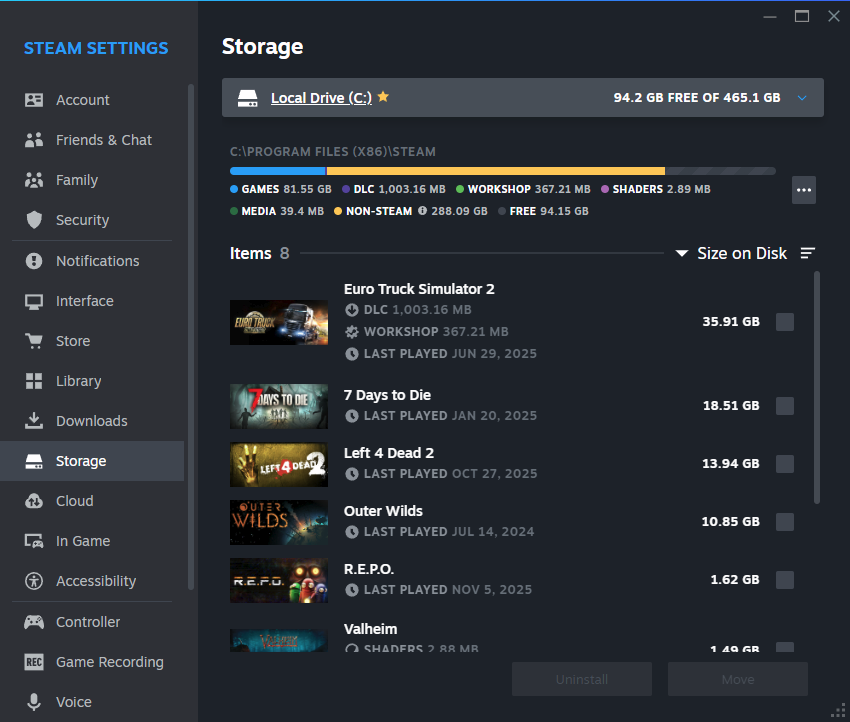
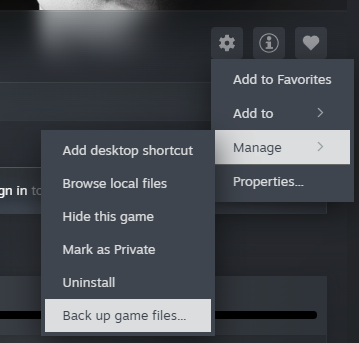
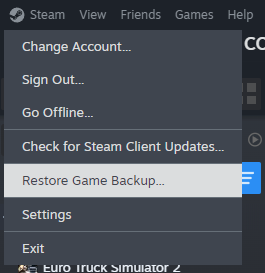
Gaming on Linux and NTFS do not mix. You will run into lots of errors and crashes. For steam games, you can use the backup/restore function to copy games over from the NTFS drive to a non NTFS drive.
Also I highly recommend not using AI at all for questions. It has about a 95% error rate. It will give you incorrect or hallucinated information.
You are better off going to Linux discords and forums and chatting with humans that have experience.
Thank you for replying. Is the steam game backup/restore the setting option on steam to move steam games between different drives:
Or this one?:
You are better off going to Linux discords and forums and chatting with humans that have experience.
I check out the source that AI cites and go from there. This is usually in conjunction with using other search engines as well that’s not Google.
You can also just copy/paste the game’s folder and its appmanifest.acf file. The next time you start Steam it’ll be in your library ready to play.
I just did this yesterday, moving games from my Windows nvme to my Bazzite nvme.
Only down side is you have to open every .acf file in a text editer one by one to find out which game its for, lol.
Well, it is another method, even if tedious lol. Thanks
I’ve never used the first option. I was meaning the second one. That’s how I moved my files over. When restoring it, steam automatically downloads the required files for Linux.
Thank you. Honestly I never used that one, so TIL I guess.
Back when I still kept my Windows partition I would create a fat32 partition to hold the files being shared between different operating systems. I would link the media directories from the user’s directory to this partition (Documents, Pictures, etc.).
I avoided installing apps on the shared partition except for the linux version of steam. I would share steam between different distros this way. I never had issues, but I don’t often play heavy resource games.
I would occasionally mount the ntfs drive in linux to grab a file. Otherwise it was only used by windows.
Eventually I got tired of all the workarounds with windows and wiped it.
If you have enough space, or can create enough space, for a new partition in a better format, you can always move some files to the other partition, then shrink the NTFS partition to make space for extending the new partition, copy some files once again, and continue until done.
Or, you borrow a large hard drive from someone, copy all files on it, nuke the NTFS partition, create a new partition in another format, then copy the files from the borrowed hard drive back on the new partition.
Or a combination of these two.
If you have enough space, or can create enough space, for a new partition in a better format, you can always move some files to the other partition, then shrink the NTFS partition to make space for extending the new partition, copy some files once again, and continue until done.
Oh? I never came across this way when I was researching. So currently I have like 280GB out of 1.8TB of free space of that drive. so I can partition that free space in say extfat, if I do it on Windows?
I assume it has to be on windows because I copy over the files from the NTFS partition to the example exfat partition, shrink the NTFS partition, expand the exfat partition, and repeat.
Or, you borrow a large hard drive from someone, copy all files on it, nuke the NTFS partition, create a new partition in another format, then copy the files from the borrowed hard drive back on the new partition.
But this is the simplest way. I’ll ask my friends if they have spare 2TB I can borrow.
No, you do the copying and resizing on Linux. Look for a live USB for GParted, put it on an actual usb drive. It’s a great recovery tool to have around.
I saw GParted on the CachyOS ISO. I’m sure it’s on other distro’s ISO. I can give that a look.
You need to back up your files to another drive in either case. If anything goes wrong while resizing partitions you can lose everything.
And, now that you’ve got a backup, it turns out that nuking the partition, creating a new one, and copying the files back is much faster than resizing.
- AFAIK it’s OK these days. But once you decide to stick with Linux you should go through the effort to re-format it.
- Yes, but more because of data and media. Desktop and app settings could cause trouble if you just drop them in on a new install.
-
Yep, have to do that down the line. My work files are already backed up to my portable SSD, although the portable is only 500GB as well. It’s the other personal files that I have to figure out. If I can find a deal for a same size disk or larger in these trying times, I can get to formatting it.
-
noted. I’ll still have to think if I really want it.
-
What I will say is that Claude has actually helped me deal with some niche drive partitioning issues, which I try and cross-check against human forum info. It was similar to your issue, I have an NVMe SDD in a container and wanted to dual boot to Windows in that when I felt like it. The real assist was, as a noob, getting it to take forum advice and give me step by step guidance.
Claude got me close, and ChatGPT is the worst of them all and basically wanted to do random stuff that wouldn’t have ever worked.
But, I also agree that an external NTFS drive sounds like a nightmare. Even pulling files from old HDDs recently, it’s just not a great mix.
Yeah the NTFS drive is a real road block when I have hyped myself up to change to linux for good on my PC. Everything I’m willing to wipe from my C: drive (the NVMe OS drive) I have backed up to the NTFS drive and my portable SSD, but I don’t really want to work out of that portable SSD in the long term.
AS for the AI part, i recommend learning it yourself, you don’t always have access to ai
Certainly. I don’t plan to use the direct output from AI, just that sometimes even not using google to search for answers I seem to get lost. I’ll go to to the sources the AI cites to read them myself.
As a Linux user singe the last Millennium my answers are:
- OK in the short term, terrible in the long run. NTFS does not support Linux file permissions, so the max you can use it for is storage of data, but FS checks for NTFS unser Linux are error prone
- yes, definitely. Normally i put all FS that i can write to as a user on separate parts
- wipe it if you can somehow get the fägame from steam or a native Linux Version maybe from gog. If not you could copy thröem to a New Linux fs for wine or proton
Thank you for replying.
- OK in the short term, terrible in the long run. NTFS does not support Linux file permissions, so the max you can use it for is storage of data, but FS checks for NTFS unser Linux are error prone
I see. that’s what I’m worried about when I was researching about it. A lot of what I found is that long term is really risking my data to have errors. If push comes to shove, I might just have to buy SATA SSDs and RAID them since my motherboard supports it on the BIOS (?) level.
- yes, definitely. Normally i put all FS that i can write to as a user on separate parts
Noted. I’ll partition the / and the /home into its own separate partitions.
- wipe it if you can somehow get the fägame from steam or a native Linux Version maybe from gog. If not you could copy thröem to a New Linux fs for wine or proton
Steam seems to be able to back up games files on its own. I’ll look into this more.