

62·
9 hours agoTerminal in this context is just powershell. Your system has powershell disabled which is common for managed systems of end users.
The username is the joke.
I’m not putting in more effort than you clowns unless I feel like it lol
Terminal in this context is just powershell. Your system has powershell disabled which is common for managed systems of end users.

You mean they couldn’t just stop paying their workers?
I thought AI was supposed to replace all that FTE overhead that gets in the way of shareholder profits!!!111111oneoneoneoenone
Business morons who don’t understand tech is what this bubble is all about. I can’t believe so many businesses have sunk hundreds of billions of dollars into technology that fundamentally cannot do what they fantasize it to do.
I have… hundreds… of miktrotik devices. They’re little wireless gateway white box looking ones. lol
We use them on a production floor to wirelessly connect automation equipment for videojet labeling and data collection. Wired hasn’t been great because of the environment and the fact the clowns leave the waterproof cases they live in open for some incomprehensible reason.
I can’t really give you any advice for ipv6 though.
So something sends out a broadcast packet and then the layer 3 device splits that packet out to each and every other device on the subnet. Network hardware has to use processing power to do this kind of thing, it’s pretty low demand but as a network grows it can get nuts. You’ll have all the requests of “Who has [ip]” or “Where is [mac]” etc. A lot of the random traffic then triggers broadcast responses too.
A big issue you have though is if you have any kind of thing doing autodiscovery… like add a printer, angry ip scanner, connect to a networked speaker, broadcast to a screen…etc… it’s gonna do some combination of a broadcast, or checking one by one on a specific port (usually starts low and goes high but i’m sure some moron starts at the end of the subnet and counts down.) There’s tons of little things that do this and some of them probably do it without us even thinking about it in the background. This might take certain tasks like network share discovery take an inordinate amount of time.
In businesses we usually have fairly high throughput network devices but our home devices less so. My gateway/firewall is layer 3, so is my core switch. I don’t think I have layer 3 configured on said core switch right now. My firewall ends up being my router and it has a NAT throughput of like 950mbit. My isp is gig fiber, so I already can’t utilize all of that. All the random shit going on in my network that needs to route also eats into that throughput because the firewall has limited processing power and memory. Then you start factoring in things like vpn (which my firewall hosts) which will drag down my throughput a shitload when in use and you start seeing where efficiencies can be more important.
Thankfully though, I don’t do much of anything important and my network is already overkill for anything I do. I do have options to offload the layer 3 traffic through the switch if it ever comes to it and simply have the gateway/firewall behave as a gateway for internet only.
Ah, most of the stuff I statically assign ends up providing services to dhcp devices. File shares, media servers, whatever.
Always struggled with the concept of isolated servers because usually I set them up for things I want to access. Even setting up a game server for friends i’m going to want to directly connect internally.
On the other hand in business, isolating things makes much more sense. I isolate old hosts that we can’t quite decommission or update for reasons, and setup as-isolated-as-reasonable ways for users to access these hosts like with rdp to a jumpbox that doesn’t have any other access beyond rdp and said server.

Imagine a CME that knocks out all our computers in the western hemisphere.
Current AI production is eating all the nand. Replacing everything would cost tens of thousands of dollars per person probably for years due to demand between AI and now this massive catastrophe. (Would they even bother with AI? would contracts just not be honored? I can’t even imagine how f’d the whole thing would be.)
People would be freezing in the winters from power plants going down and running out of fresh water from computers dying until they get replaced…
The world we live in today is scary.
Way too big of a broadcast domain. You’d start having perf issues if you were doing anything serious that would remotely come close to using even a fraction of the subnet.
I keep all my work stuff /22 or smaller typically. I struggle to see anyone needing anything more than /24 for home usage, and /23 for even the grandest of home lab setups if you didn’t subnet anything. The amount of random shit broadcasting is pretty nuts.
My setups are often lazy. I usually use one subnet, set my dhcp server to only hand out things starting from .100 and never run out of static assignments that way. Using a separate subnet means all your shit has to go through a layer 3 device even if they’re on an unmanaged switch or hub somewhere down the line.
Jesus christ. This madlad gave me my cornflower blue icon.

Yeah, I got my vm up and running to try it out. Because i’m on xfce I don’t even have that by default. For a second I thought I was crazy though lol.
They could install octopi or that one other alternative for a pacman gui, same as cachy has preinstalled. It’s fairly barebones though.
CachyOS has cachy-update which is still a terminal window for updates but has a tray config and will be there to let you know when stuff changes. I don’t remember where I saw it though, the updater tray wasn’t default.
eos-update seems similar on the surface and they have eos-update-notifier for a tray update notifier. After installing the thing though it’s anything but the same. It’s very user-unfriendly compared to cachy-update. I shouldn’t have to dig for a man page to configure an application with a gui presence (tray icon) imo but i’m being nitpicky.
Interesting, they don’t list it under package management.
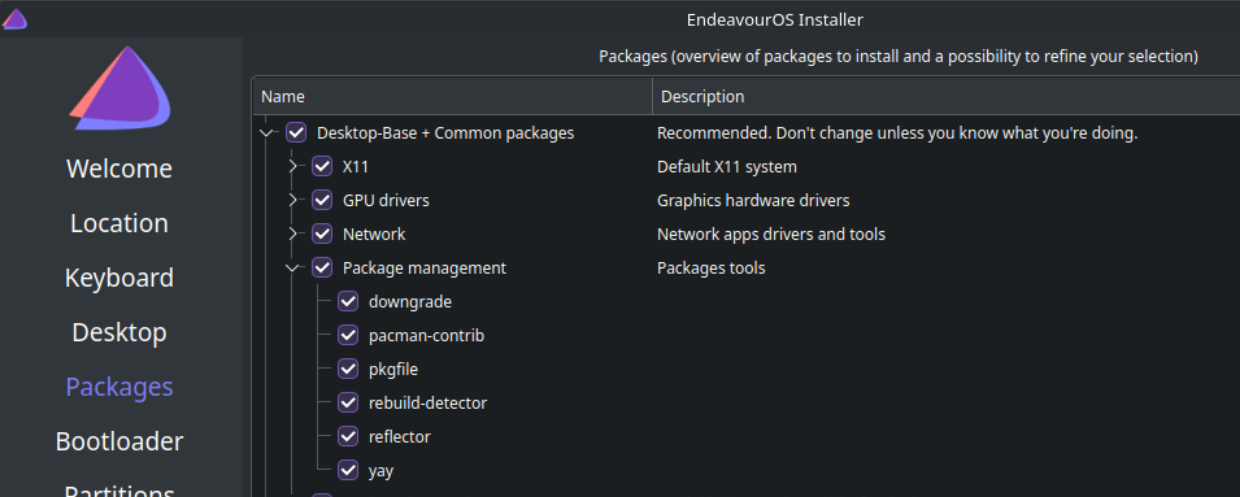
Reinstalling with xfce this time to see how it looks. I swore all I had was pacman / yay.
So fucking stupid.
They need to provide notice they are coming every single day, and just not show up until they randomly decide to.
365 notices gives you 365 random inspections. If you plan one every single day, they can’t complain you didn’t give notice.
Pop 24 pissed me off so much that I had to do a distro swap. Cosmic has a lot left to work on to be usable for me. Too many headaches.
Bin wise, stuff like mesa 25.1.5 not even supporting fsr4 on a nearly year old 9070xt was enough for me to be like “what am I even doing here?” - cachyos may not have yesterdays nightly mesa build but it does have 25.3.x from very recent. Everything is way ahead of pop. I’m about a month in on just smashing update and praying, but so far zero issues. I even have HDR and VRR working!
Pop was my first Linux distro for gaming. I intended to try it for 6mo-year or so before trying another because I am very patient and learning to troubleshoot things is fun. By the end of three months I had so many things I wanted to install or update and so many of them were in their repos or they had old versions. I upgraded to and tried 24 for another month or so before the jump.
My theory is that Pop accrued a shit ton of technical debt moving to cosmic and it shows. They clearly are continuing to build stuff out and doing bug fixes like crazy but they are at the bottom of a hole and they need to dig themselves out. This hole is gonna take their whole team way longer than a year to get out of imo. When they finally do, maybe then cosmic will be the DE of our dreams. It sure was a fast de, but it also has barebones features. I need to see how it performs once the features are closer to parity with all these very mature 20+yo DEs, but that may take a while.
Cachyos is very user friendly. I moved from popos and love it.
100% of endeavor is using command line pacman for all your application installs and updates. They are like base arch with a wizard for installing. I installed them once in a work system and tried them for half a day before saying to myself “this isn’t worth it.”
Both are using arch, but cachyos has a much better curated set of bins for gaming for people who don’t want to pick and choose what things do what and really dig deep into custom repos and modules.
Cachyos has been rock solid for me too. Highly recommend limine for a bootloader with a btrfs partition so you can have btrfs snapshots that are easily recoverable (other loaders work, limine is just what I see recommended the most for it for some reason, I think I use systemd-boot for mine.)
Cachyos has a wiki with an install guide as well as a gaming section I highly recommend following.
Pop os bins are so out of date, I gained substantial performance and all the games I really had to fuck with to get working on pop 22/24 just fucking worked- no joke- on cachy. You don’t need to constantly update your proton versions either, cachyos keeps their one up to date as part of the distro and it’s already there in steam as an option if you install the gaming packages they have prepared with gamemode and other things.
You can’t just copy your home folder over. Arch does things differently than pop/ubuntu. You can however move over stuff to your new user folder bit by bit. My Firefox config went over and even kept my signed in sessions.
Anywho, your call on which to go with.

It depends on the thickness of his ear hairs and the density of the hairs. Also depends on how much ear wax buildup there is. Chekhov is quite old at this point and that changes over time.
There may also be a very rare chance that the ear canal may be nonstandard due to a genetic mutation. I recommend scanning with a tricorder just to be sure. Not a medical one, we are talking about structure.
The saucer section has never been so… stylish.
I wonder if I can get it in purple.
I’m just happy to see you.
Please hands off the smartees I hoard in pants.

Unless they make trump the chairman of the board and replace the rest with his chosen mouthpieces, he’d rather pocket the trillion in a Qatar slush fund.
If it was like 25b maybe they would do it, but 1400b is better spent erecting gold monuments in every city with a 3 year lease that has terms to drop the monuments off in maralago
The scale of their commitments is just… too big.


Look up the 1859 CME. Lloyds of London said back in 2013 that a sufficiently sized CME hitting the US would cost 600 billion to 2.3 trillion in damage. Power outages could last for up to two years. Inflation and rollout of even more technology would make that number look much larger today.
CMEs actually can produce electricity in circuitry. Really tiny circuitry that can only handle very small voltage and amperage can be fried if such a thing occurs. This kind of circuitry is in almost any kind of electronics.
anyway, here’s the lloyds of london report. https://assets.lloyds.com/assets/pdf-solar-storm-risk-to-the-north-american-electric-grid/1/pdf-Solar-Storm-Risk-to-the-North-American-Electric-Grid.pdf